

Even technically sophisticated friends are currently getting “hacked” on Facebook — here’s how to avoid it, and how to make sure your hacked account is fully recovered.
Usually, accounts are “hacked” because someone somehow gets a hold of your password. That’s bad for Facebook in particular, because people often use Facebook to log into other things — so if someone gets into your Facebook account, they have access to a bunch of other things too.
If your account has been hacked
Your account being “hacked” can take many shapes. Perhaps someone is sending messages on your behalf, posting as you or doing something else weird.
If you can still log in, you’re in luck; here’s what to do:
Change your password right away — that’s your first step, if you still have the power to do so. If you can’t log in, request a password reset. If that doesn’t work, it’s possible that someone has changed the email address on the account. There’s a way of dealing with that, too.
Report the weird behavior to Facebook, so they can help stop it happening to others.
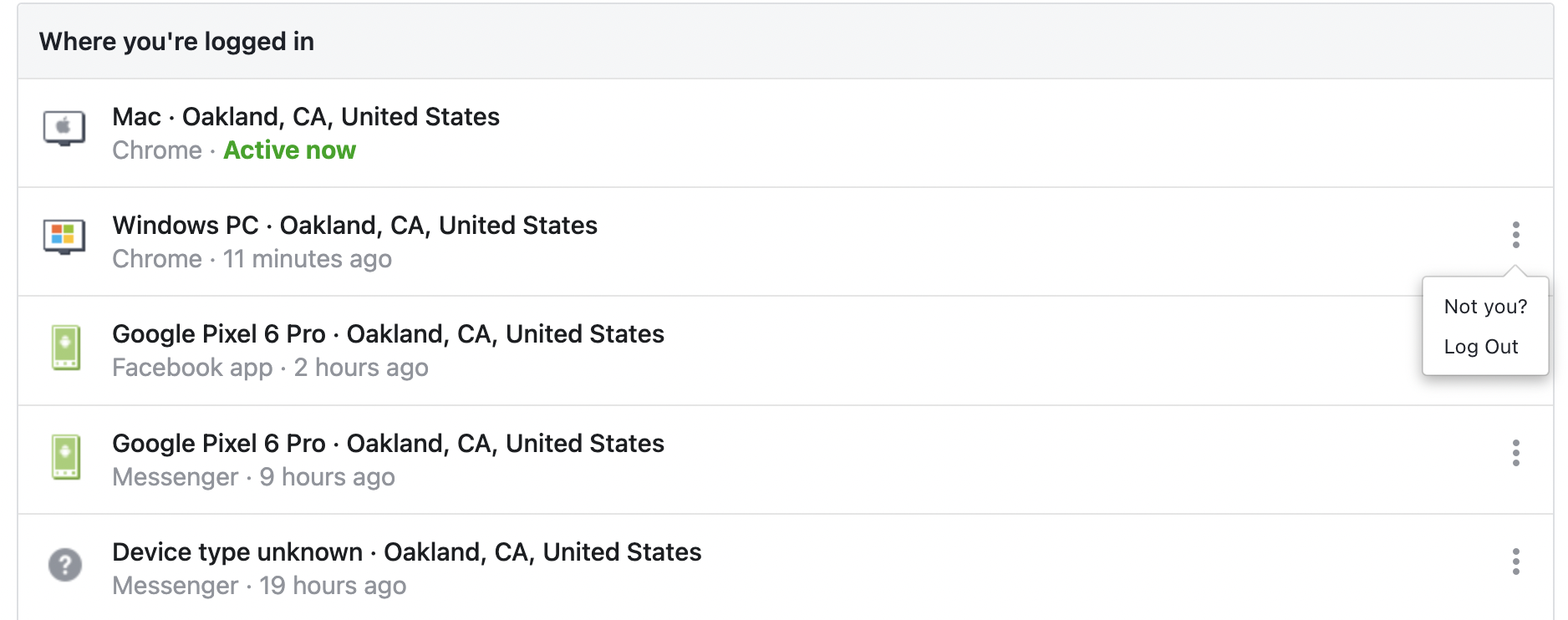
Go to your security settings, and see if you recognize everywhere you are logged in. If you don’t recognize a location or a device, press the three-dot menu, and select “not you?”. This will log you out and will help you further secure your account.
Check that you recognize all apps and websites that have access to your Facebook account. Same as above; if there’s something you don’t recognize, hit “remove”.
In your general settings, check the e-mail addresses Facebook has listed for you. If there’s anything there that isn’t yours, remove it.
Change your password one more time, now that you know hackers (in theory) don’t have access to your account anymore. It should be a secure password (with letters, numbers and special characters). Don’t re-use your password from somewhere else. Ideally, use a password manager to ensure that you can keep track of all your different passwords, and use higher-quality passwords in general.
Turn on two-factor authentication. That means that even if your password was somehow stolen, they can’t log in without also having access to your phone or your authenticator app.
And finally, whenever something weird happens to your security and/or social media, change your email password. It’s bad enough to lose access to your social accounts, but your email is the holy grail for hackers, so rotating that password regularly (every 1-3 months) and changing it whenever something strange happens is a very good idea.
How to prevent getting hacked
The most common way that a Facebook account is compromised is by tricking you into giving the hackers your password. You may get a Messenger message from a friend on Facebook, saying something like “OMG did you see who died?” with a link. You click on the link, it looks like Facebook, but suddenly you’re being asked to log in again. You think nothing of it, and you type in your email and password… Uh-oh. Problem: The site that you just gave your password to isn’t actually Facebook, and now they have your password.
The best way to avoid this is to follow the steps above and turn on two-factor authentication. Then be vigilant: Whenever you log in, are you logging into a site that starts with https://www.facebook.com? If not — if it looks like something like ffacebook.com or facebook.this-is-a-security-notification.com — don’t type in your password. The safest thing, typically, is to manually type in Facebook.com into your URL bar if you’re using a web browser.
Remember that the Facebook app has a browser built in. So it’s possible that you are ‘in’ the Facebook app, but it could ask you for a password. It looks legitimate — how could it not be, this is the Facebook app — but use your head; if you’re already in the app, why would it ask you to log in? In short: If it seems weird, it is weird — don’t type in your password!
Check the apps that have access to your Facebook account (see above) semi-regularly. If you recognize an app but you haven’t used it in a while and you don’t think you’ll need it — delete it. You can always add it again later.



