

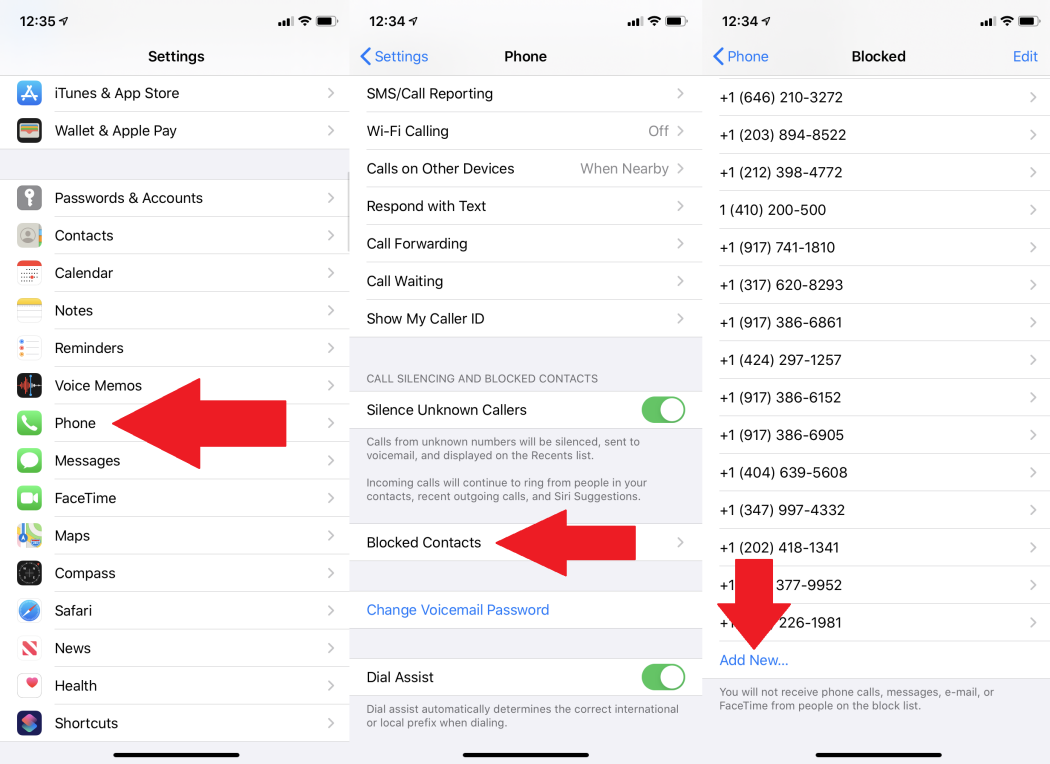
If you want to stop a phone number calling or texting you, blocking them is generally pretty easy to achieve that. Although different phones handle the process differently, it’s not always obvious how to do it.
That’s why we came up with our very own guide on how to block numbers on your personal iPhone or Android device, as well as show you how to block spam and text messages, so you can freely use your smartphone.
So dive into our article to learn how to block a number on your phone. We have taken the liberty of breaking this guide into two sections – the first covering how to do it on an iPhone and the second detailing how to do it on an Android phone.
How to Block a Number on an iPhone
TECHNOLOGY
TECHNOLOGY
TECHNOLOGY
Apple features a built-in call-blocking utility on the iOS operating system. This feature, alongside all versions of iOS since the release of , allows you to quickly block calls, messages, and FaceTime requests without having to use any external software or third-party apps. You can easily access this feature through your contact list or settings menu.
Once properly set up, blocked calls will automatically be routed to your voicemail. There will be no indication that a call, text, or FaceTime request has been received on your end. However, indications like sent receipts will still show up on the sender’s device as they typically would — meaning the sender would not know they’re blocked from reaching you.



