

Have you ever been in a situation where you sent an email and realized immediately that you needed to take it back? Maybe it was inappropriate, or you just sent it to the wrong person. If so, then you’ve probably wondered, “Is it possible to unsend an email?” The answer is yes, it is.
Gmail and Outlook are both platforms that give you the opportunity to unsend emails for a limited amount of time after you send them. This is because you can’t take an email back once it reaches the recipient’s inbox.
You can, however, delay the email-sending process for a short period of time after you hit send. This gives you a short window to unsend the email before it’s too late. You can achieve this with the “Undo Send” feature, but it has to be enabled before you can use it.
How to Unsend an Email with Gmail
TECHNOLOGY
TECHNOLOGY
TECHNOLOGY
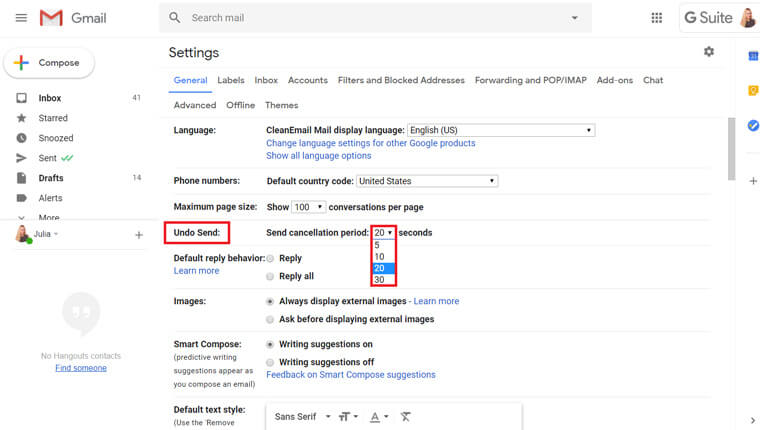
With Gmail, the “Undo Send” feature is automatically enabled. However, by default, the emails are only held for five seconds, which hardly gives you any time to change your mind. You can change this setting to allow you up to 30 seconds, but choose whichever time frame feels best for you. 20 or 30 seconds should be enough time.
To change the time frame, go to “Settings” in Gmail, click “See all Settings,” and click on the “General” tab. From there, navigate to “Undo Send” and adjust the “Send Cancellation Period” to fit your preference.



