Finance Inquirer
No Result
View All Result
Sunday, November 8, 2026
  • Login
  • Home
  • Business
  • Technology
  • Finance
  • Stock Market
Subscribe
Finance Inquirer
  • Home
  • Business
  • Technology
  • Finance
  • Stock Market
No Result
View All Result
Finance Inquirer
No Result
View All Result
Home Technology

5 of the best free scanner apps for iPhone and Android

Tom Hagler by Tom Hagler
02.01.2022
in Technology
5 of the best free scanner apps for iPhone and Android
152
SHARES
1.9k
VIEWS
Share on FacebookShare on Twitter

It’s a rarity to find a peer with a printer, let alone a scanner. As technology evolves, it seems like the scanner is going the way of the fax machine, slowly but surely slipping into oblivion.

That is, until you’re moving apartments, applying for a loan, or doing your taxes, and, all of a sudden, you need one of those ancient technologies and don’t have access to one.

Thankfully, there are a few apps for that.

1. Notes (iOS)

Two screenshots of how scanning on the Notes app works This might be the easiest way to get scannning done, but there aren’t a lot of extra frills. Credit: Screenshot Notes

If you have an iPhone, are in dire need of a PDF scanner, and don’t want to download a new app, you can scan by using your pre-installed Notes app. Simply tap on the camera icon, choose “Scan Documents,” and follow the prompts. This is great if you need a quick job, but there aren’t many additional features beyond a simple scan.

2. Adobe Scan (Android and iOS)

Three screenshots of how Adobe Scan works This might be the easiest way to get scannning done, but there aren’t a lot of extra frills. Credit: Screenshot/iOS store Adobe Scan

Adobe Scan is super easy to use, and reviewers say the scans come out looking great. Your scans are automatically saved on Adobe Document Cloud, so you can access them from any phone, tablet, or computer. It’s free, and it’s reliable.

3. Microsoft Office Lens (Android and iOS)

Three screenshots of how Microsoft Office Lens works Adobe Scan is one of the easiest and most reliable options Credit: Screenshot/iOS store Microsoft Office Lens

Microsoft Office Lens is very similar to Adobe Scan, but is great if you’re more accustomed to Microsoft software. It is also free, reliable, and easy to use.

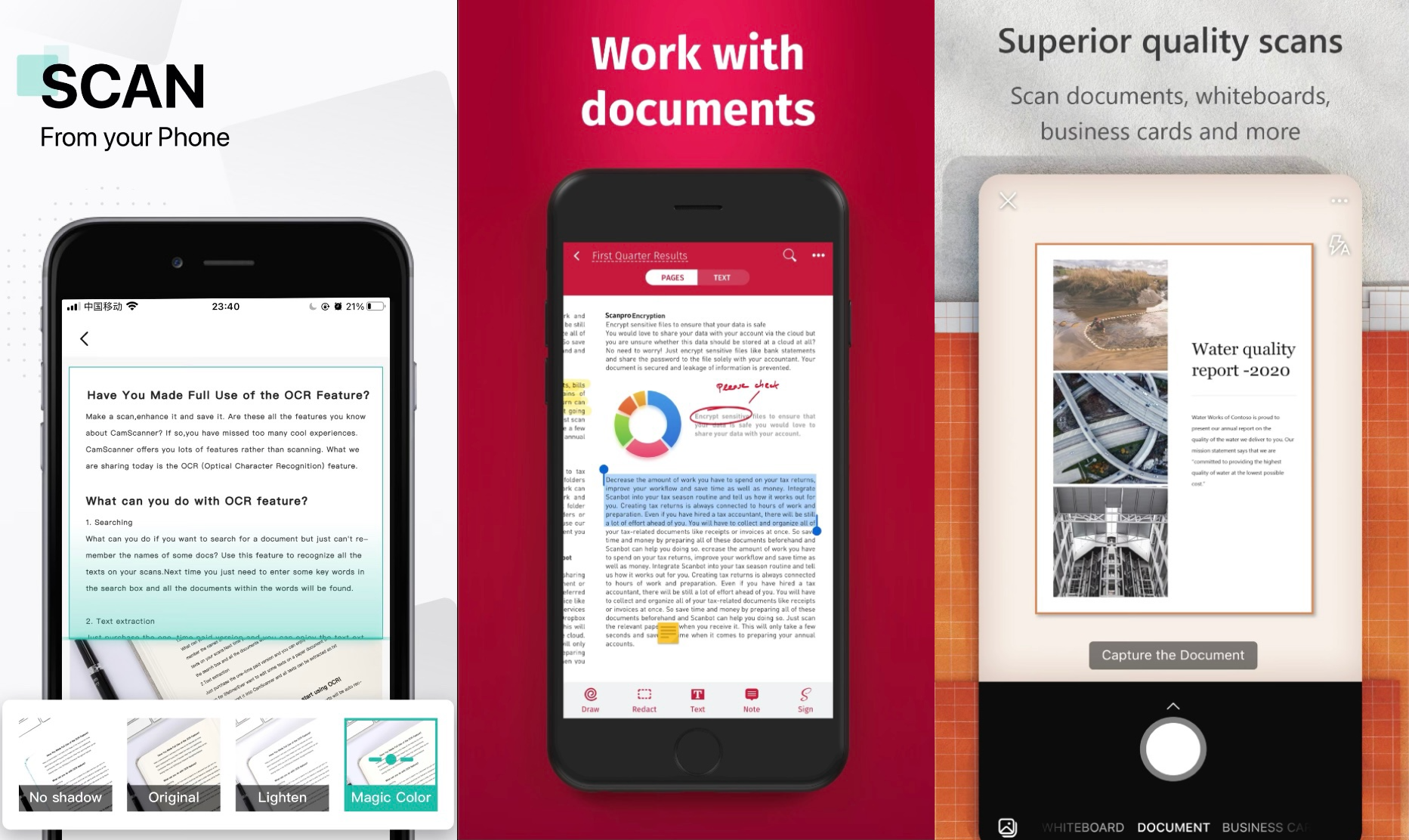
4. CamScanner (Android and iOS)

Three screenshots of how CamScanner works Free and simple Credit: Screenshot/iOS store CamScanner

This free app allows you to scan, merge, and access cloud storage — like iCloud or Google Drive. But the app does add a small watermark on your scanned documents, so it might not work for every document scan.

5. SwiftScan (Android and iOS)

Three screenshots of how SwiftScan works It’s free, but it adds a watermark Credit: Screenshot/iOS store SwiftScan

SwiftScan has a ton of features that other scanners don’t have, like file naming, faxing, organization tools, and dozens of cloud storage services. There are free versions of the app for iPhone, iPad, and Android, but the $7.99 upgrade to “Pro” is what really steals the show.

If you can’t convince yourself to download an app, you can always scan documents at your local printing kiosk and at some office supply stores. Happy scanning!

tech?d=yIl2AUoC8zA tech?d=7Q72WNTAKBA tech?i=BMAQgTIU8dg:sQIPhXAm8t4:V_sGLiPBp tech?d=qj6IDK7rITs tech?i=BMAQgTIU8dg:sQIPhXAm8t4:gIN9vFwOq

  • Trending
  • Comments
  • Latest
P2Pro: profitable changes are coming!

P2Pro: profitable changes are coming!

13.09.2022
Saving and investing the two keys to your future retirement

Saving and investing the two keys to your future retirement

21.06.2022
The Dow Jones slept through the whole trade despite positive data from the labor market. Nasdaq had its best streak of gains this year

The Dow Jones slept through the whole trade despite positive data from the labor market. Nasdaq had its best streak of gains this year

01.09.2022
The ranking of countries in terms of the coverage of children with preschool education has been compiled

The ranking of countries in terms of the coverage of children with preschool education has been compiled

03.11.2022
Take the best photos of your life with the new vivo Y76 5G now available

Take the best photos of your life with the new vivo Y76 5G now available

Complete your Christmas shopping with up to 75% off on devices at vivo’s Big Christmas Sale on Shopee

Complete your Christmas shopping with up to 75% off on devices at vivo’s Big Christmas Sale on Shopee

AirPods 3 vs AirPods 2 – What’s the Difference?

AirPods 3 vs AirPods 2 – What’s the Difference?

Want to be a content creator? Here are 5 valuable tips from today’s top Pinoy online celebrities

Want to be a content creator? Here are 5 valuable tips from today’s top Pinoy online celebrities

European Technical Expands AMC Services Across Dubai Amid Rising Demand

04.11.2026
Occams Advisory Earns 9th Inc. 5000 Honor, Soars to No. 798 in 2025

Occams Advisory Earns 9th Inc. 5000 Honor, Soars to No. 798 in 2025

12.09.2025

A Family debt of €20 million marks a new chapter in Dasha Ozden’s life

04.09.2025

SnapInspect Shares Five Key Factors to Consider When Choosing Property Inspection Software

25.08.2025

Recent News

European Technical Expands AMC Services Across Dubai Amid Rising Demand

04.11.2026
Occams Advisory Earns 9th Inc. 5000 Honor, Soars to No. 798 in 2025

Occams Advisory Earns 9th Inc. 5000 Honor, Soars to No. 798 in 2025

12.09.2025

Categories

  • Business
  • Finance
  • News
  • Stock Market
  • Technology
  • Без рубрики

Site Navigation

  • Home
  • Contact Us
Finance Inquirer

We offer multimedia features, easy channel navigation, strong social media presence and numerous engagement platforms that allow the readers to experience content anytime, anywhere, always.

No Result
View All Result
  • Home
  • Business
  • Technology
  • Finance
  • Stock Market

© 2021 financeinquirer.com

Welcome Back!

Login to your account below

Forgotten Password?

Retrieve your password

Please enter your username or email address to reset your password.

Log In
